
“AI-native EHR” is the phrase of the moment, and it’s worth pausing on before you buy something based on it. Most EHRs marketing “AI” have bolted a summarize button onto a system designed a decade ago. An AI-native approach means something different: documentation that’s generated by AI as the default, not typed into a template with an AI feature added on the side. For a therapist drowning in notes, that distinction is the difference between a tool that saves you real time and one that adds a button you rarely use.
This guide explains what “AI-native” actually means for therapists, how to tell genuine AI-first design from marketing, the HIPAA-compliant EHR criteria that can’t be skipped, and, honestly, how the AI documentation layer and the EHR fit together in practice today, because that’s not always one product.
What “AI-Native EHR” Actually Means
An EHR (electronic health record) is the system of record for your practice, the clinical chart, usually alongside scheduling, billing, and a client portal. “AI-native” describes a design philosophy where AI is foundational to how the system works, especially documentation, rather than a feature layered onto a traditional design.
In practice, for therapists the most meaningful “AI-native” promise is about documentation: instead of opening a blank SOAP template and typing, the system generates the note from your session and you edit it. The note creation flips from you write it to you review it. That single change is what reclaims evenings, and it’s the litmus test for whether “AI-native” means anything in a given product.
Feature | AI-native / AI-first | AI bolted on |
|---|---|---|
Default note creation | AI drafts from the session | You type into a template |
AI's role | Foundational to the workflow | An optional button |
Time saved | High — editing replaces composing | Low — minor assistance |
Personalization | Learns your clinical voice over time | Generic output |
Honest test | "Does it write the note, or do I?" | "It summarizes, but I still write." |
The Reality: EHR + AI Documentation Layer
Here’s the honest part the marketing often blurs. Today, the strongest AI-first documentation experience for many therapists doesn’t come from a single all-in-one “AI EHR.” It comes from pairing a solid HIPAA-compliant EHR (your system of record) with a dedicated AI documentation layer that generates your notes and syncs them into that EHR.
Supanote is exactly that layer: it’s not a standalone EHR and doesn’t try to be your scheduling-and-billing system. It’s an AI documentation tool built for mental health professionals that drafts your notes from sessions and uses its “Super Fill” feature to push them into the EHR you already use, SimplePractice, TherapyNotes, IntakeQ, Practice Fusion, Sessions Health, and others, without copy-paste. The result feels AI-native at the point that matters most (documentation) while keeping your chart in one governed system of record.
Why this matters for the buyer: if you go looking for a single product that is both a full EHR and genuinely AI-native for documentation, you may find the AI is bolted on. Pairing a trusted EHR with a true AI documentation layer often delivers the AI-first experience more reliably, and lets you keep an EHR you already trust.
What to Look For in an AI-First Documentation Setup
Whether you’re evaluating an “AI EHR” or an EHR-plus-layer combination, look for:
- AI that drafts, not just summarizes. The note should be generated from the session in your format, ready to edit.
- Multi-format support. SOAP, DAP, BIRP, GIRP, intake, treatment plans, and ideally custom templates.
- Personalization. Does it learn your clinical voice so drafts need less editing over time?
- True integration / autofill. Notes should land in your chart with one click, not copy-paste, and without creating a second PHI store.
- Mental-health specificity. It should understand clinical language (“affect,” “thought process,” “therapeutic alliance”), not generic meeting-summary output.
- Compliance built in (see the checklist below).
The HIPAA-Compliant EHR Checklist
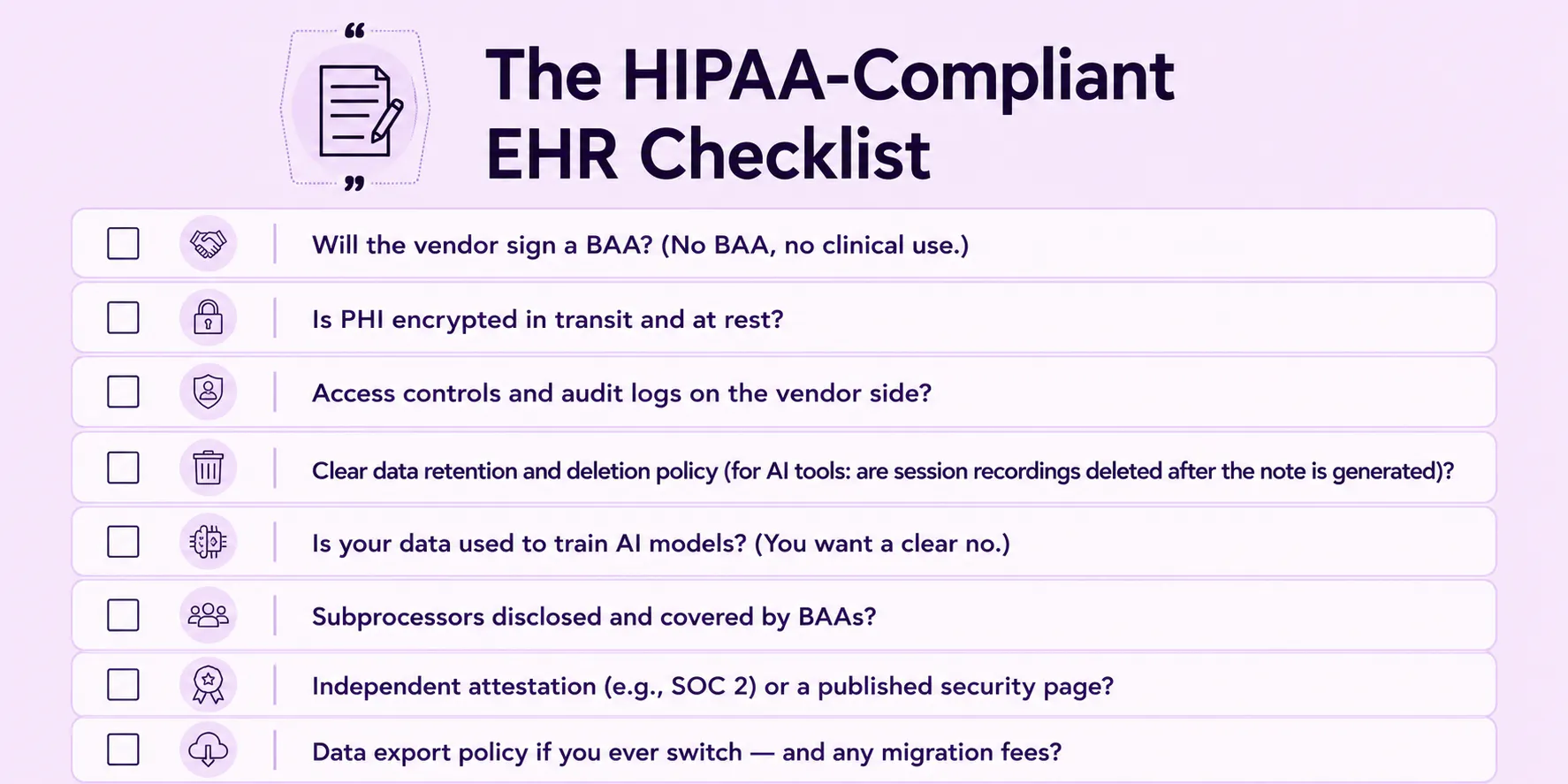
For the “hipaa compliant ehr” part of your search, non-negotiable for any system or layer touching PHI:
☐ Will the vendor sign a BAA? (No BAA, no clinical use.)
☐ Is PHI encrypted in transit and at rest?
☐ Access controls and audit logs on the vendor side?
☐ Clear data retention and deletion policy (for AI tools: are session recordings deleted after the note is generated)?
☐ Is your data used to train AI models? (You want a clear no.)
☐ Subprocessors disclosed and covered by BAAs?
☐ Independent attestation (e.g., SOC 2) or a published security page?
☐ Data export policy if you ever switch, and any migration fees?
(Our HIPAA-compliant AI apps guide expands each of these.)
How the AI Layer Works on Top of Your EHR
Here’s the workflow and the honest division of labor.
You run the session as usual. The AI layer drafts a structured note in your chosen format, naming interventions in clinical language and adapting to your style over time. You review and edit. One click (Super Fill) pushes the finished note into your EHR’s chart. Your system of record stays in one place; the note-writing burden is gone.
What the AI handles: drafting the note, holding format, naming interventions, learning your voice, and syncing to your chart without copy-paste.
Where you stay responsible: the clinical interpretation and medical-necessity call; the non-verbal observations AI can’t capture (affect, psychomotor signs); risk documentation, which you review directly; and the final signature, because accountability for the record is yours regardless of how the draft was produced. The AI supplements your documentation; it doesn’t replace your clinical judgment.
If you want the full practice platform scheduling, intake, and operations alongside documentation, that’s a Supahealth platform conversation, and you can book a live demo. If you specifically want the AI documentation layer that drafts notes and syncs to your existing EHR, that’s Supanote, and you can try it for free.
Choosing by Practice Size
- Solo private practice. You likely already have (or can adopt) a lean HIPAA-compliant EHR. The highest-leverage move is adding a true AI documentation layer on top, rather than migrating to a heavy “AI EHR” you’ll only partly use. Prioritize the layer’s draft quality and one-click sync.
- Small group practice. Consistency and governance start to matter. You want a shared EHR as the system of record, an AI layer with shared templates so notes stay uniform across clinicians, clean sync into one chart, and a BAA covering the whole team. Per-clinician pricing that scales becomes a real factor.
- Larger clinic. Lead with governance role-based access, audit logs, standardized templates, and a documented compliance trail across many clinicians. The “drafts vs. types” question still applies, but it’s joined by administration and auditability at scale.
(For the broader category comparison, see our mental health documentation software guide.)
FAQ
Ques: Is there a single “AI-native EHR” I can buy that does everything?
Ans: Some products market themselves that way, but for many therapists today the most reliable AI-first documentation experience comes from pairing a trusted HIPAA-compliant EHR with a dedicated AI documentation layer that syncs into it. The risk with a single all-in-one “AI EHR” is that the AI is bolted onto an older design. Ask the litmus question, does it write the note or do you? before assuming “AI-native” means AI-first.
Ques: Is Supanote an EHR?
Ans: No. Supanote is an AI documentation layer, not a standalone EHR, it doesn’t handle scheduling, billing, or claims and isn’t your system of record. It generates your notes from sessions and pushes them into the EHR you already use via its “Super Fill” feature. If you need a system of record, you need an EHR; Supanote then sits on top of it to handle the note-writing.
Ques: What makes an EHR “HIPAA compliant”?
Ans: There’s no government certification, so compliance is something you verify: a signed BAA, encryption in transit and at rest, access controls and audit logs, clear data retention and deletion, disclosed subprocessors, and, for AI tools, no training on your data. A published security page or SOC 2 report is meaningful third-party evidence. The label on a website is the start of your diligence, not proof.
Ques: How is an “AI-native” approach different from an EHR that added an AI feature?
Ans: In an AI-native workflow, the note is generated from your session by default and you edit it. AI is foundational. In an EHR with a bolted-on feature, you still type into a template and AI offers minor help, like a summary. The time saved is very different: editing a draft reclaims real hours; a summarize button rarely does. Judge by whether the system writes the note or just assists.
Ques: Will an AI documentation layer work with my existing EHR?
Ans: That’s the point of the layer model good ones sync into common EHRs (SimplePractice, TherapyNotes, IntakeQ, Practice Fusion, Sessions Health, and others) so notes land in your chart with one click. Confirm support for your specific system before adopting. Keeping your existing EHR and adding the layer is usually less disruptive than migrating to a new “AI EHR.”
Ques: Does pairing an AI layer with my EHR create two copies of client data?
Ans: A well-designed layer avoids that by pushing the finished note into your EHR (one system of record) and minimizing data on its own side stripping identifiers and deleting recordings after the note is generated. Confirm the vendor’s retention and deletion policy. The goal is one governed chart, not a parallel PHI store.
Ques: I’m a solo therapist — do I need an “AI EHR” or just an AI note tool?
Ans: Most solo therapists are best served by a lean HIPAA-compliant EHR plus a dedicated AI documentation layer, rather than a heavyweight all-in-one “AI EHR.” The layer targets your actual pain note-writing time without committing you to a large system you’ll only partly use. Prioritize draft quality and one-click sync into whatever EHR you choose.
Ques: How disruptive is switching to an AI-first documentation setup?
Ans: If you add an AI layer on top of your current EHR, it’s minimally disruptive, you’re not migrating your record, just changing how notes get written. Switching the EHR itself is a bigger project involving data migration and possible fees, so ask about export policies up front. Either way, execute the BAA first and trial on real sessions before committing.
Ques: Does an AI layer handle all my note types, or just progress notes?
Ans:The better tools handle the documentation lifecycle, progress notes (SOAP, DAP, BIRP, GIRP), intake/biopsychosocial assessments, and treatment plans and let you use custom templates. If you document across several formats, confirm the tool drafts each, so you’re not falling back to manual entry for intakes and treatment plans.
Ques: Can a group practice run this setup consistently?
Ans: Yes. Use a shared HIPAA-compliant EHR as the system of record and standardize note creation through an AI layer with shared templates, so charts stay uniform across clinicians. Execute a BAA covering the team with each vendor, and confirm the integration and templates work across all clinician accounts before rolling out.
References
U.S. Department of Health & Human Services. Summary of the HIPAA Security Rule. https://www.hhs.gov/hipaa/for-professionals/security/laws-regulations/index.html
U.S. Department of Health & Human Services. Business Associate Contracts. https://www.hhs.gov/hipaa/for-professionals/covered-entities/sample-business-associate-agreement-provisions/index.html
U.S. Department of Health & Human Services. Guidance on HIPAA & Cloud Computing. https://www.hhs.gov/hipaa/for-professionals/special-topics/health-information-technology/cloud-computing/index.html
The Office of the National Coordinator for Health Information Technology. What is an electronic health record (EHR)? https://www.healthit.gov/faq/what-electronic-health-record-ehr
American Psychological Association. (2007). Record Keeping Guidelines. https://www.apa.org/practice/guidelines/record-keeping
This article is educational and not legal advice. For compliance decisions specific to your practice, consult a qualified healthcare attorney.
Written by Sam T, Founder & CEO of Supanote. Sam writes about behavioral health documentation, care workflows, and the operational realities of modern therapy practice.
